PORTFOLIO
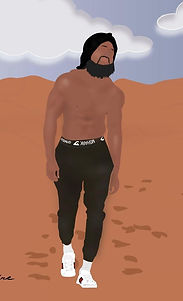
Tona Lisa
Created with Adobe Illustrator
Create this project in Illustrator using the pen tool. Taking an image of my friend, I traced the outline of the body, clothing, facial hair, and accessories- inserting these features in their separate layers. From each layer- starting with the figure. I began to contour and add shadows/ blemishes seen on the original image onto the vector figure using the shading tool, highlights, color palate, and blending tool to make the features look surreal

Kinwick Essentials
Created with Written Calligraphy
Using written handwriting- I created a design concept for one of my business ventures: Kinwick Essentials. Used an iPhone to draw with my finger the letters: K and W. Then uploaded the potential design to Adobe Illustrator to abstract the wanted design- refined it and converted it into a vector file to be used as a logo.

Church Flyer
Created with Photoshop and Illustrator
Using the focus point person's tie- I abstracted the colors from the material to be used- as the flyer's color scheme. I removed the person from their image background to center him within the advert and incorporated a second duplicate of the image to create the backdrop of the flyer

Turf Apparel
Created with Illustrator
This logo was developed using a Typography method in Illustrator. Using the pen tool- the letter T was drawn with the pen tool to extend more across the logo, and the U-R-F was adopted from a preset type-face. Then adding shadowing to give contrast and depth of focus to the logo

Party E-vites
Created with Illustrator
These E-vites were created using Illustrator. They were used to promo a business launch party. The color scheme was abstracted by the focus point person's photo and the hearts to resemble valentines candy hearts was created with shapes.

Church CTFU!
Created with Vintage Logo & VN Video Editor
This video intro-, was designed for an Instagram story segment I like to call "CHURCH CTFU" it showcased the lateness- comical church memes and videos that have gone viral. The typeface was created using a logo design app: Vintage logo. That had similar attributes to Adobe Illustrator, and the video was composed using a video editor app: VN Video Editor.

Shaded by Drea Nicole
Created with Shopify
This site's template was preset- default but modified to suit the customer- The color scheme was mocha, bronze, and chocolate. Design look for layout- a parallax-ish magazine style. So, I altered the CSS and other site settings- that would; make it easy enough for me to incorporate those critical elements requested.

Create and Conquer
Created with Illustrator
This vector was inspired by an advert on Pinterest- using the pen tool I took the photo traced the outline of the body with the pen tool, and began to contour (with colors, tones, and shades) and add shadows seen on the original image onto the vector figure using the shading tool, highlights, color palate, and blending tool to make the features look surreal and 3D

SMH NEWZ
Created with Illustrator & VN Editor
S.M.H (Shake My Head) Newz was developed- in 2020 as a Hot Topic- News segment via my Instagram page to showcase the current developments that were occurring during the 2020 riots. However, due to growing popularity, I officially made it a blog. Hence, @Smhnewz was born! The logo and background graphics- including the videos- transitions- were all created by me.

Pastor 21st Anniversary
Created with Illustrator & Canva
Using the focus point from the Pastor's robe and tie- I abstracted the colors from the material to be used- as the flyer's color scheme. The ripped paper effects are just tool presets. I removed the couple from their image background (that I took) with my iPhone 13 removal feature. Adjust the image coloring to bring out more contrast for the advert via iPhone settings. While also including a photo (with its opacity lowered- a tad) of the church's stained glass window and inserting it within the flyer's background. Which was created using Canva.

QVC Email Design Concept
Created with Illustrator
Created as an Email concept- for QVC's new marketing approach to attract more women shoppers and their majority demographic


Temple of Divine Love Logo
Created with Illustrator
This logo was created using Illustrator. The trademark concept was inspired by the "T" in Temple. I took two "T's" and fooled around with their composition, shaping- removing, part of the Ts with my cut tool- and came up with this monogram of two letters- simple, minimal, and elegant. However, although I love the design- the church wanted the logo to resemble an emblem to be worn as a badge. Hence, the gold metalic-like ring was designed around the initial logo to incase it with the wording "Temple of Divine Love Church - God is love"

PORTFOLIO
Tona Lisa
Created with Adobe Illustrator
Create this project in Illustrator using the pen tool. Taking an image of my friend, I traced the outline of the body, clothing, facial hair, and accessories- inserting these features in their separate layers. From each layer- starting with the figure. I began to contour and add shadows/ blemishes seen on the original image onto the vector figure using the shading tool, highlights, color palate, and blending tool to make the features look surreal
Kinwick Essentials
Created with Written Calligraphy
Using written handwriting- I created a design concept for one of my business ventures: Kinwick Essentials. Used an iPhone to draw with my finger the letters: K and W. Then uploaded the potential design to Adobe Illustrator to abstract the wanted design- refined it and converted it into a vector file to be used as a logo.
Church Flyer
Created with Photoshop and Illustrator
Using the focus point person's tie- I abstracted the colors from the material to be used- as the flyer's color scheme. I removed the person from their image background to center him within the advert and incorporated a second duplicate of the image to create the backdrop of the flyer
Turf Apparel
Created with Illustrator
This logo was developed using a Typography method in Illustrator. Using the pen tool- the letter T was drawn with the pen tool to extend more across the logo, and the U-R-F was adopted from a preset type-face. Then adding shadowing to give contrast and depth of focus to the logo
Party E-vites
Created with Illustrator
These E-vites were created using Illustrator. They were used to promo a business launch party. The color scheme was abstracted by the focus point person's photo and the hearts to resemble valentines candy hearts was created with shapes.
Church CTFU!
Created with Vintage Logo & VN Video Editor
This video intro-, was designed for an Instagram story segment I like to call "CHURCH CTFU" it showcased the lateness- comical church memes and videos that have gone viral. The typeface was created using a logo design app: Vintage logo. That had similar attributes to Adobe Illustrator, and the video was composed using a video editor app: VN Video Editor.
Shaded by Drea Nicole
Created with Shopify
This site's template was preset- default but modified to suit the customer- The color scheme was mocha, bronze, and chocolate. Design look for layout- a parallax-ish magazine style. So, I altered the CSS and other site settings- that would; make it easy enough for me to incorporate those critical elements requested.
Create and Conquer
Created with Illustrator
This vector was inspired by an advert on Pinterest- using the pen tool I took the photo traced the outline of the body with the pen tool, and began to contour (with colors, tones, and shades) and add shadows seen on the original image onto the vector figure using the shading tool, highlights, color palate, and blending tool to make the features look surreal and 3D
SMH NEWZ
Created with Illustrator & VN Editor
S.M.H (Shake My Head) Newz was developed- in 2020 as a Hot Topic- News segment via my Instagram page to showcase the current developments that were occurring during the 2020 riots. However, due to growing popularity, I officially made it a blog. Hence, @Smhnewz was born! The logo and background graphics- including the videos- transitions- were all created by me.
Pastor 21st Anniversary
Created with Illustrator & Canva
Using the focus point from the Pastor's robe and tie- I abstracted the colors from the material to be used- as the flyer's color scheme. The ripped paper effects are just tool presets. I removed the couple from their image background (that I took) with my iPhone 13 removal feature. Adjust the image coloring to bring out more contrast for the advert via iPhone settings. While also including a photo (with its opacity lowered- a tad) of the church's stained glass window and inserting it within the flyer's background. Which was created using Canva.
QVC Email Design Concept
Created with Illustrator
Created as an Email concept- for QVC's new marketing approach to attract more women shoppers and their majority demographic
Temple of Divine Love Logo
Created with Illustrator
This logo was created using Illustrator. The trademark concept was inspired by the "T" in Temple. I took two "T's" and fooled around with their composition, shaping- removing, part of the Ts with my cut tool- and came up with this monogram of two letters- simple, minimal, and elegant. However, although I love the design- the church wanted the logo to resemble an emblem to be worn as a badge. Hence, the gold metalic-like ring was designed around the initial logo to incase it with the wording "Temple of Divine Love Church - God is love"
Design Inspiration
Created with Illustrator
Create this project in Illustrator using the pen tool. I traced the outline of the body, clothing, facial hair, and accessories- inserting these features in their separate layers. From each layer- starting with the figure. I began to contour and add shadows/ blemishes seen on the original image onto the vector figure using the shading tool, highlights, color palate, and blending tool to make the features look surreal